
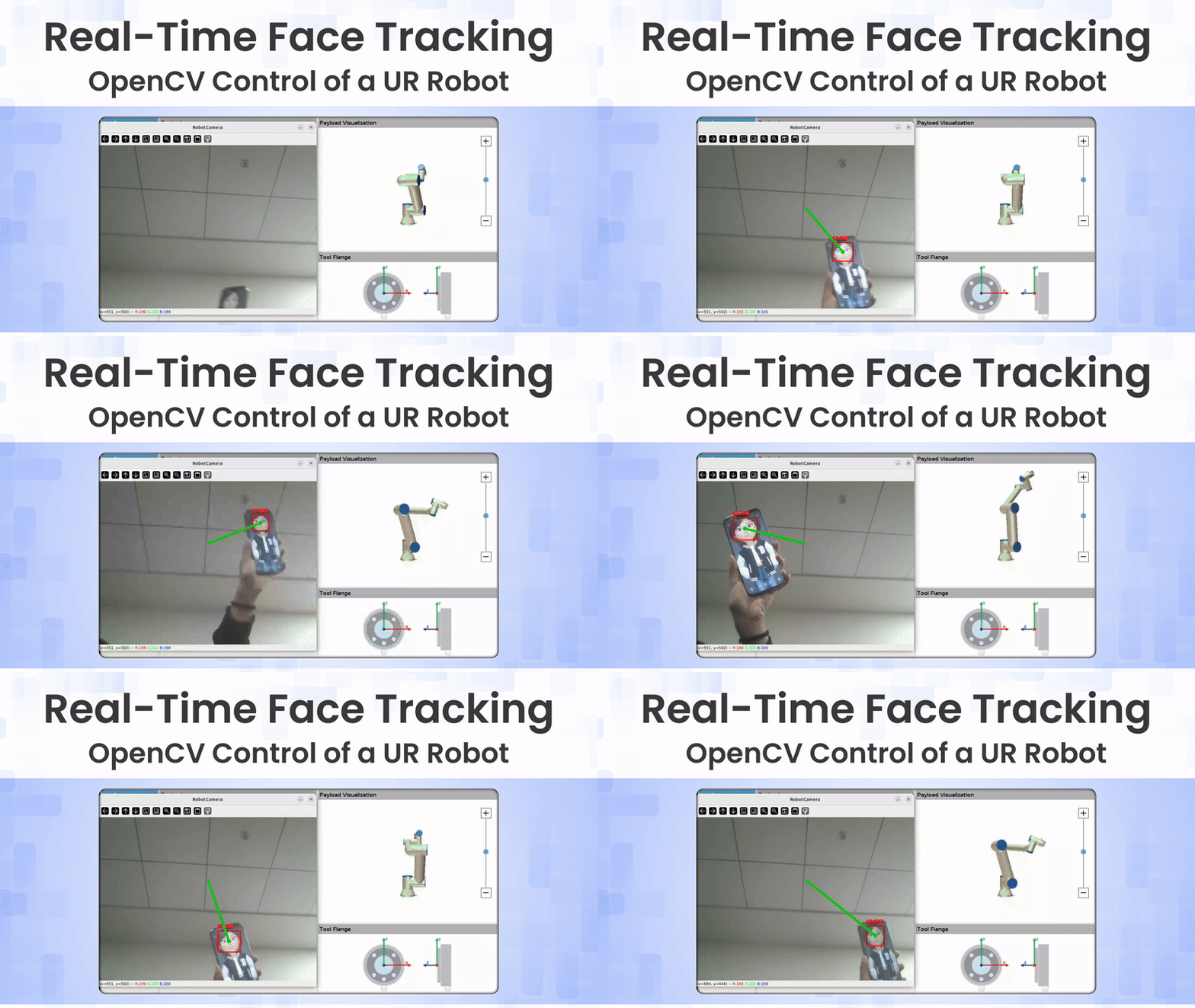
Picture an industrial robot that doesn’t wait for button presses or predefined programs, but instead reacts instantly to your presence. As you move, the robot’s tool gently adjusts its position, tracking your face in real time and responding with smooth, deliberate motion. This kind of interaction, where vision directly drives robotic behavior, highlights how computer vision can make industrial systems feel far more intuitive and human-aware.
This project controls a Universal Robots UR5 using real-time face tracking built with OpenCV. A standard webcam provides a live video stream that detects a human face, computes its position relative to the image center, and maps this offset into the robot’s Cartesian workspace. The robot’s tool center point (TCP) is then updated continuously, resulting in smooth, responsive motion that follows the user’s movements rather than discrete commands.
The system uses low-latency, real-time communication with the robot controller and has been validated on a UR5 CB-series robot running Polyscope 3.7. It can also be safely tested in URSim, enabling experimentation without physical hardware. Overall, the project demonstrates how classical computer vision combined with real-time robot control can transform an industrial manipulator into an interactive, human-responsive system.
Table of contents
1. Why Face Tracking for Robots?
In a world where robots are increasingly sharing spaces with humans, from collaborative manufacturing floors to home assistants, the way we interact with them matters more than ever. Traditional methods often rely on clunky hardware like joysticks, teach pendants, or haptic gloves, which can feel unnatural and limit accessibility. Enter face tracking: a hands-free, intuitive approach where the robot simply “looks” where you do, responding to your gaze or position as if engaged in a conversation.
This project dives into the potential of vision-based robotics, showing how a standard webcam and software can turn a rigid industrial arm into an attentive companion. By leveraging classical OpenCV techniques for face detection, without requiring deep learning frameworks such as TensorFlow, ROS middleware, or even a physical robot, we explore rapid prototyping in a simulated environment. It’s all about accessibility: build and test ideas quickly, without hardware barriers.

1.1. Potential Applications:
The face-tracking UR robot project unlocks diverse uses by merging affordable vision with robotic control, creating intuitive, responsive systems. Key application areas include:
- Intuitive HRI: Face and simple gesture tracking enable natural, contactless control without physical interfaces.
- Collaborative Workspaces: The robot can track human position and attention to support safer, smoother collaboration.
- Service Robotics: Face tracking allows robots to maintain eye contact, follow users, and respond more naturally in public or domestic environments.
- Assistive & Rehabilitation Robotics: Head movements or facial gestures can be used as control inputs, helping users with limited mobility perform tasks.
Overall, OpenCV-based face tracking is well-suited for real-time, interactive UR robot control when combined with appropriate safety limits and motion smoothing.
2. System Overview
At its core, this face-tracking system creates a closed-loop pipeline that bridges computer vision with robotic control, allowing the robot to mimic human-like attentiveness in real time. Here’s a high-level breakdown of the workflow:
Webcam
  ↓
OpenCV Face Detection (DNN)
  ↓
Face Center Offset (pixels)
  ↓
Pixel → Meter Scaling
  ↓
TCP Pose Update
  ↓
Universal Robot (URSim)
In plain terms, the process starts with a live video stream from a standard webcam. OpenCV’s DNN module scans each frame to detect faces, identifying the central point of the detected face. It then calculates how far this center deviates from the middle of the image (the “offset”) in pixel units. This offset is scaled into real-world meters to match the robot’s physical workspace, ensuring movements feel proportional and natural.
Next, the scaled values are clamped to predefined limits to prevent excessive or unsafe motions. Finally, the system computes a new Tool Center Point (TCP) pose for the robot, incorporating position adjustments and subtle rotations, and sends it via URScript commands for immediate execution. This loop runs continuously, updating the robot’s pose as long as a face is in view, resulting in smooth, responsive tracking.
The beauty lies in its simplicity: no complex sensor fusion or external libraries beyond basics, making it easy to understand and extend.
3. Simulation
Diving straight into hardware for robotics projects can be a barrier, real Universal Robots arms are expensive, require setup space, and come with safety risks during testing. That’s where simulation steps in as a game-changer, letting you prototype, debug, and refine without touching metal. However, traditional URSim (Universal Robots’ official simulator) often requires a full virtual machine installation, which entails challenges such as excessive resource consumption, OS compatibility issues, and the need to log in to a UR account.
This project sidesteps all that by using the Docker-based URSim, an official containerized version provided by Universal Robots (available on Docker Hub as universalrobots/ursim_e-series). Docker encapsulates the simulator in a lightweight, isolated environment that starts in seconds, making it far more accessible.
You can easily obtain it in two main ways:
- From the Universal Robots website: For traditional URSim versions (e.g., Linux or non-Linux/VM setups), visit the Universal Robots download center. Search for “Offline Simulator” or “URSim,” select the appropriate version (such as e-Series for Linux 5.12.6 or non-Linux VM images), and download the files. Note that this requires creating a free account and logging in to access the files.
- From Docker Hub: Simply pull the image directly using the command docker pull universalrobots/ursim_e-series (or specify a tag for a particular version, like docker pull universalrobots/ursim_e-series:5.12.6). No account or login is required; just have Docker installed on your system.
Key advantages of the Docker approach include:
- No UR account login: Skip the registration hurdles, pull the image, and run.
- No VM required: Forget heavy hypervisors like VirtualBox or VMware; Docker runs natively on your host OS with minimal overhead.
- Cross-platform compatibility: Works seamlessly on Linux, macOS, or Windows (with Docker Desktop), ideal for diverse development teams.
- RTDE out of the box: Real-Time Data Exchange (the protocol for smooth motion control) is fully supported, no extra configuration needed.
4. Implementation
The goal is to create a real-time face-tracking system where the robot follows a person’s face within a defined workspace. This showcases integration between computer vision (OpenCV) and robotic control (UR-RTDE). The robot moves in a bounded 2D plane, adjusting its position and rotation based on the face’s location in the camera feed.
Key Components:
- Face Detection: Uses a pre-trained DNN model from OpenCV (SSD-based on ResNet-10) for accurate and efficient detection.
- Robot Control: Leverages the UR-RTDE protocol for real-time data exchange, allowing smooth, continuous motion without discrete steps.
- Kinematics: Custom inverse kinematics (in UR5Kinematics.py) to convert face positions into joint angles.
Repository Structure:
Files:
- Face_tracking.py: Main script for running the face tracking.
- UR5Kinematics.py: Handles inverse kinematics for the UR5 robot.
- requirements.txt: Lists Python dependencies.
- .gitattributes and .gitignore: Git configuration files.
Directories:
- URBasic/: Contains utility scripts for basic UR robot control (e.g., connection, pose handling). Likely includes classes like RobotModel and UrScriptExt for RTDE communication. No detailed code summaries available, but it’s a wrapper for UR scripting.
- MODELS/: Holds pre-trained models for face detection:
- deploy.prototxt.txt: Prototxt file defining the network architecture (SSD with ResNet-10 base).
- res10_300x300_ssd_iter_140000.caffemodel: Caffe model weights for 300×300 input, trained on face detection.
Requirements:
- Python 3.x.
- Python Libraries (from requirements.txt):
certifi==2020.12.5
imutils==0.5.4
math3d==3.3.5
numpy==1.20.1
opencv-python==4.5.1.48
six==1.15.0
wincertstore==0.2- Install via: pip install -r requirements.txt in a virtual environment (e.g., venv or Conda).
- URSim simulator (download from Universal Robots website or via Docker). Tested on UR5 CB running Polyscope 3.7; works with URSim for simulation.
4.1. Setup and Installation
Install Dependencies:
Create a virtual environment:
python -m venv env
source env/bin/activate  # On Linux/Mac
Then:

pip install -r requirements.txtThis pulls in essentials like numpy, opencv-python, imutils, and math3d
Configure the Robot:
- Get the robot’s IP (e.g., via ifconfig on the robot’s terminal or URSim settings).
- Edit Face_tracking.py:
- ROBOT_IP: Set to your robot’s IP.
- ACCELERATION and VELOCITY: Adjust for speed (e.g., 0.9 and 0.8; lower for safety).
- robot_startposition: Joint angles for start pose (in radians). Manually move the robot in Polyscope and copy values.
- video_resolution: Camera feed size (e.g., (700, 400); smaller for faster detection).
- m_per_pixel: Scales pixel movement to meters (e.g., 0.00009).
- max_x and max_y: Max movement range (e.g., 0.2m each direction).
- hor_rot_max and ver_rot_max: Max rotations (e.g., 50° horizontal, 25° vertical).
Run URSim (if simulating):
- Launch URSim and ensure it’s networked to your computer.
- Use Docker for simplicity:
docker pull universalrobots/ursim_e-series

docker run --rm -it -p 5900:5900 -p 6080:6080 -p 29999:29999 -p 30001-30004:30001-30004 universalrobots/ursim_e-series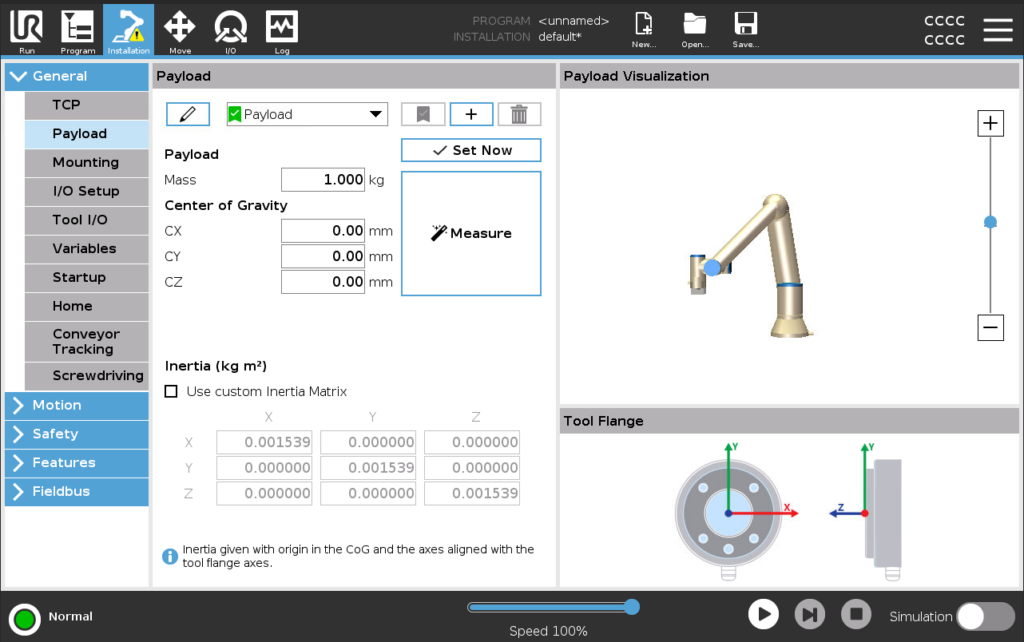
Access the Polyscope GUI via VNC (e.g., at localhost:5900) or web (localhost:6080). Enable RTDE in the simulator settings if prompted.
Run the Script:
python Face_tracking.pyThe script connects, moves to the start pose, and starts tracking. Stop with Ctrl+C.
Troubleshooting: Ensure RTDE is enabled on the robot (see UR-RTDE Guide).
4.2. How it Works
The system captures video frames, detects faces using OpenCV’s DNN module, calculates the offset from the frame center, scales it to robot coordinates, and sends real-time pose updates via RTDE.
Key Steps:
- Initialization: Connect to the robot, set the start pose, and initialize the camera stream.
- Face Detection (find_faces_dnn function):
- Resize frame, create blob, pass through DNN model.
- Filter detections by confidence (>0.4).
- Draw boxes and calculate center offsets.
- Position Mapping (move_to_face function):
- Scale pixel offset to meters.
- Clamp to max_x/y limits.
- Compute rotations based on position percentages.
- Use math3d for transforms and send the new pose.
- Loop: Continuously grab frames, detect faces, and update the robot if a face is found.
- Kinematics (UR5Kinematics.py):
- Implements forward/inverse kinematics for UR5.
- Uses DH parameters (d, a, alpha).
- Selects optimal joint solutions based on closeness to the current pose.
Code for Face_tracking.py (Main Script):
def main():
    # initialise robot with URBasic
    print("initialising robot")
    robotModel = URBasic.robotModel.RobotModel()
    robot = URBasic.urScriptExt.UrScriptExt(host=ROBOT_IP, robotModel=robotModel)

    robot.reset_error()
    print("robot initialised")
    time.sleep(1)

    # Move Robot to the midpoint of the lookplane
    robot.movej(q=robot_startposition, a=ACCELERATION, v=VELOCITY)

    robot_position = [0,0]
    origin = set_lookorigin()

    robot.init_realtime_control()  # starts the realtime control loop on the Universal-Robot Controller
    time.sleep(1) # just a short wait to make sure everything is initialised

    try:
        print("starting loop")
        while True:
            frame = vs.read()
            face_positions, new_frame = find_faces_dnn(frame)
            show_frame(new_frame)
            if len(face_positions) > 0:
                robot_position = move_to_face(face_positions,robot_position)

        print("exiting loop")
    except KeyboardInterrupt:
        print("closing robot connection")
        robot.close()

    except:
        robot.close()

if __name__ == "__main__":
    main()
Code for UR5Kinematics.py (Kinematics Handler):
def main():
    # Example desired pose (4x4 Transform matrix or math3d Transform)
    # Replace this with your actual target pose
    import math3d as m3d

    # Start joint positions (rad) for reference
    start_joints = [0, -pi/2, 0, -pi/2, 0, 0]

    # Define a target pose (example: identity transform)
    target_pose = m3d.Transform()  # identity pose at origin

    # Initialize Kinematic class
    kin = Kinematic()

    # Compute inverse kinematics
    joint_angles = kin.invKine(target_pose, start_joints)

    # Print results
    print("Computed joint angles (rad):")
    for i, angle in enumerate(joint_angles):
        print(f"Joint {i+1}: {angle:.4f} rad, {math.degrees(angle):.2f}°")


if __name__ == "__main__":
    main()
( Full source code is available at the OpenCV Github repository.
4.3. Understanding the outputs
Running Face_tracking.py produces real-time visual feedback through the OpenCV camera window and URSim interface, confirming detection and control. Here’s a concise breakdown, tied to the screenshots.
Camera Feed Window (“RobotCamera”)
This displays the live webcam stream with detection overlays:
- Bounding Box and Confidence: Red box around face with confidence score (e.g., “96.20%”) in red.
- Offset Indicators: Green line from center to face midpoint; debug coords (e.g., “x=125, y=257”) and colors (e.g., “R:111 G:121 B:120”).
- Updates as you move; raw video if no face is visible. Stop with Ctrl+C or Esc.
Robot Simulation in URSim
The Polyscope-like GUI shows the virtual UR5 responding:
- “Move” tab shows TCP coords (e.g., X: -194.08 mm, Y: 198.49 mm) and joints (e.g., Base: -197.72°). Real-time updates: horizontal moves shift X/Y, vertical tweaks Z/rotations.
- 3D view: Arm moves smoothly from the start. RTDE keeps it fluid.
- Status: “Speed 100%” in “Simulation” mode; watch for RTDE warnings.
Overall System Behavior and Troubleshooting
- Success: Face detected → overlays appear, robot follows (e.g., left shift moves arm left). Loops until stopped; console logs poses/errors.
- Failures: “Connection refused” for bad IP; skipped updates on low confidence; blank feed for camera issues.
- Tips: Add console output for debugging; tune resolution for improved speed.
Conclusion
This project shows how real-time face tracking with OpenCV can turn a standard UR robot into a responsive, human-aware system. Using only a webcam, classical computer vision, and real-time robot control, the UR5 smoothly follows human movement without physical controllers or complex middleware.
By leveraging URSim and Docker, the system can be developed and tested safely in a virtual environment, enabling rapid prototyping. While demonstrated with face tracking, the same approach can be extended to gestures, attention awareness, and collaborative robotics, highlighting how simple vision-driven control can make industrial robots more intuitive and interactive.
References:


5K+ Learners
Join Free VLM Bootcamp3 Hours of Learning