
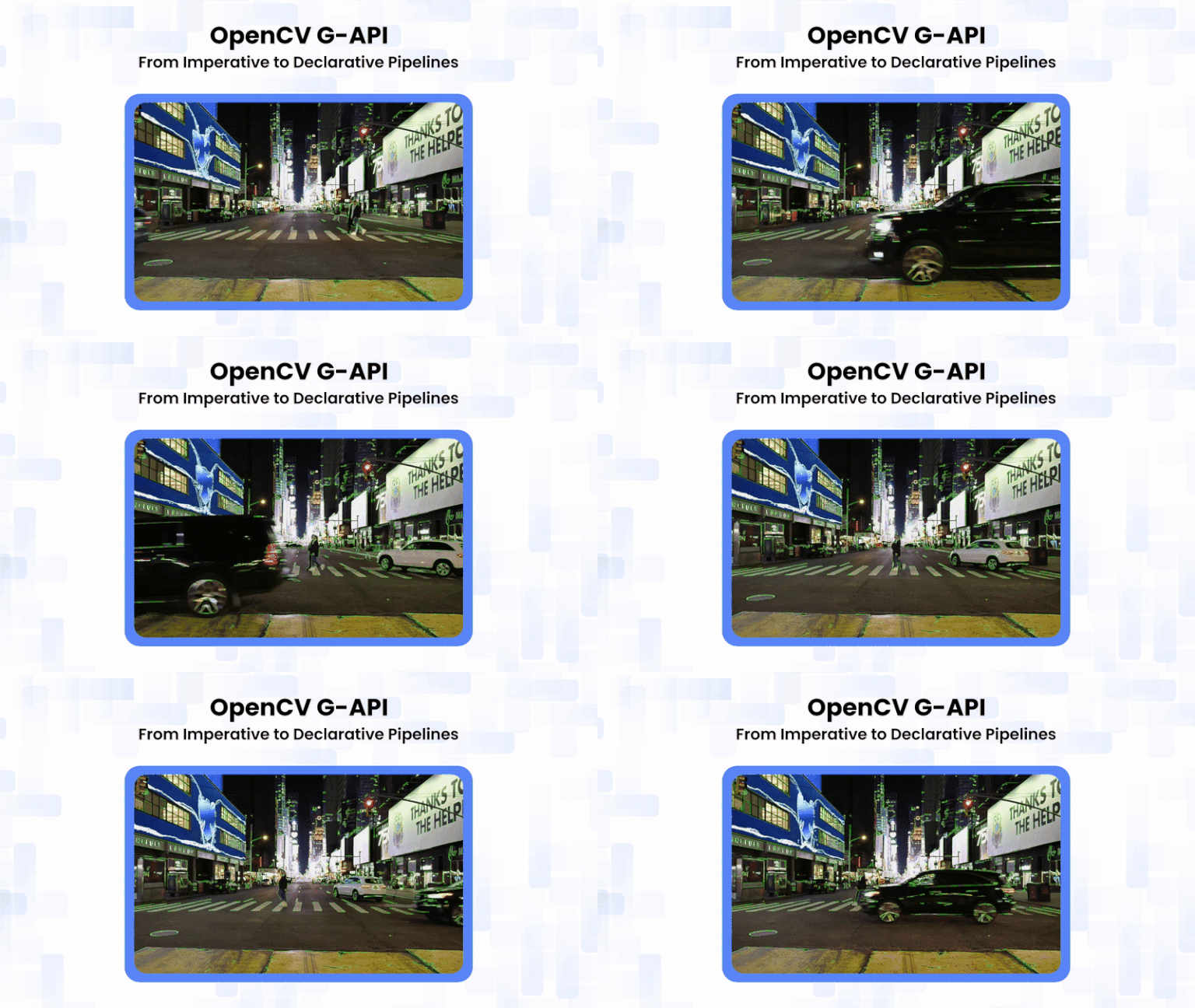
If you’ve ever used OpenCV to process live video from webcams, IP cameras, or recorded streams, you know the pattern: a loop pulling frames and a growing chain of image-processing calls. It works, but it often feels like assembling IKEA furniture without the right tools, doable, yet increasingly inefficient as complexity grows. What if you could declare your pipeline as a recipe and let the system optimize it across CPUs, GPUs, or even a Raspberry Pi?
Traditional OpenCV follows an imperative model: each function executes immediately, produces an intermediate result, and proceeds to the next step. While intuitive, this approach makes it challenging to optimize memory usage and fully exploit modern, heterogeneous hardware. This is where G-API (Graph API) steps in. It shifts the paradigm from immediate execution to graph-based declaration. In this post, we’ll explore G-API and see it in action with Edge and Motion detection.
Table of contents
1. What is Graph API, and why graphs?
OpenCV Graph API (G-API) is a separate module in OpenCV. It allows you to design, optimize, and execute computer vision pipelines. Instead of using a sequence of imperative function calls, the pipeline is described as a directed acyclic graph (DAG). It is called a graph because each operation is represented as a node. Data flows between nodes along edges, forming a complete view of the processing pipeline. It is called an API because it provides a clean programming interface for declaring, compiling, and executing these graphs.
The core idea is first to declare what should be computed. This is expressed as a graph of high-level operations on abstract data objects. Later, authentic images are bound to the graph. At that point, decisions are made about how and where the graph should run, such as on the CPU, the Fluid tiling backend, or OpenCL.
1.1 Motivation behind G-API
OpenCV has traditionally been used as a function-oriented image processing library. You load an image into a cv::Mat, apply an operation, get the output immediately, and move to the next step. This model is simple, intuitive, and highly effective for small to medium-sized pipelines.
However, vision systems can grow more complex. They may involve long processing chains, multiple inputs, streaming data, and hardware acceleration. In such cases, the immediate, step-by-step execution model starts to show limitations. To address this, OpenCV introduced G-API (Graph API), which does not add new algorithms but instead changes how vision pipelines are described and executed.
Aspects behind G-API:
- Optimization: Traditional OpenCV provides highly optimized functions. However, chaining them into a pipeline leaves memory management, cache locality, and execution-order optimization to the developer. Even OpenCV’s T-API (cv::UMat) improves hardware offloading. Yet, its function-by-function execution limits optimization at the pipeline level. G-API solves this by representing the entire pipeline as a computation graph. It captures all operations and data dependencies upfront. This approach enables pipeline-level optimization, such as tiling. Tiling processes the image in smaller blocks to improve memory usage and cache efficiency. As a result, data locality improves, memory usage is reduced, and parallelism increases. At the same time, the code remains clean, portable, and maintainable.
- Portability: G-API separates what an algorithm does from how it is executed. Pipelines are built using abstract operations (kernels), with implementation selected later via backends. A single G-API graph can run on CPU, GPU, or specialized accelerators without modifying the algorithm, making it easy to port pipelines across devices.
1.2. Applications of OpenCV G-API
- Real-Time Video Processing: Efficient pipelines for webcams, IP cameras.
- Multi-Stage Image Processing: Combines operations like blur, color conversion, and edge detection in a single optimized pipeline.
- Embedded Systems: Runs efficiently on low-power devices like Raspberry Pi or Jetson.
- Complex Computer Vision Systems: Useful for surveillance, autonomous vehicles, and industrial inspection, where many processing stages need to be combined and optimized.
2. The G-API Architecture: 3-Layer Powerhouse
G-API isn’t just a library of functions; it’s a framework with a unified API for image-processing pipelines across multiple backends. You write hardware-neutral code. G-API then selects the best kernels and devices automatically. It is like swapping car engines without redesigning the chassis. This approach keeps pipelines both portable and efficient.
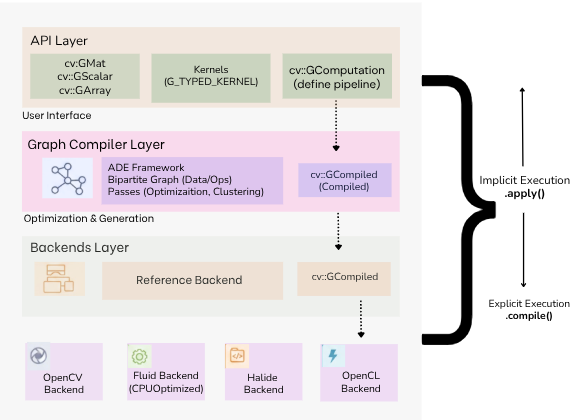
There are three layers in this architecture:
- API Layer (“The What”): The top layer that implements the G-API public interface, its building blocks, and semantics. Serves as the user’s primary interface, providing dynamic data objects such as cv::GMat, cv::GScalar, and cv::GArray to define data flow. Operations are described via kernels, either using built-in functions or custom ones (G_TYPED_KERNEL()), and wrapped in a cv::GComputation object to represent the functional graph.
- Graph Complier Layer: This intermediate layer unrolls computation into a graph and applies transformations (e.g., optimizations). Built on the ADE Framework, it represents the high-level description as a bipartite graph of Data and Operation nodes. The compiler performs a series of passes to validate the graph and optimize data flow. It also clusters operations into “Islands” based on hardware affinity. The result is a cv::GCompiled object.
- Backends Layer: The lowest layer lists platform-specific Backends that execute the compiled graph. The OpenCV backend serves as a reference for prototyping. The Fluid backend provides specialized CPU optimizations for better memory locality and a smaller footprint. Since G-API uses a uniform internal API across these backends, the system is easily extensible to new platforms, such as OpenCL or Halide.
3. Kernel API: The important abstraction in G-API
The core idea of G-API is portability. Algorithms are described independently of hardware. The actual implementation is chosen later, when the pipeline is compiled for a specific backend, such as CPU or GPU. This is achieved using the Kernel API. The Kernel API separates the what (interface) from the how (implementation).

1. Defining a Kernel Interface: To create a new operation, you define its interface using the G_TYPED_KERNEL() macro.
- Signature: It uses an std::function-like signature. Input can be G-API dynamic types (cv::GMat, cv::GScalar, cv::GArray<T>) or regular C++ types.
- Metadata (outMeta): Each kernel must include an outMeta static function. This tells the compiler what the output should look like (resolution, depth, type), which helps with memory allocation and the graph.
Example:
G_TYPED_KERNEL(GFilter2D, <cv::GMat(cv::GMat, int)>, "org.opencv.filter2D") {
    static cv::GMatDesc outMeta(cv::GMatDesc in, int ddepth) {
        return in.withDepth(ddepth);
    }
};
( Here, GFilter2D is defined generically; the compiler knows the output depth but not how it will be implemented yet.)
2. Implementing the Kernel:
- Purpose: Actual computation for a specific backend.
- Backend-specific implementation: For example, using GAPI_OCV_KERNEL for CPU.
- Dynamic types to concrete types: G-API converts cv::GMat (abstract type) to cv::Mat (CPU implementation) inside the run() method.
- Kernel packages: Implementations are grouped into packages that the compiler can choose from. This allows swapping backend logic without changing the pipeline code.
3. Compound Kernels: Some operations are too complex to do in a single step. Compound kernels let you break them into a subgraph of simpler operations.
- How: Use GAPI_COMPOUND_KERNEL() and the expand() method to return a combination of other G-API operations.
- Purpose: This is useful for backends that cannot handle a complex task in a single pass (e.g., splitting a feature detection algorithm into a response calculation and a non-maxima suppression step).
4. The G-Effect: What Changes When Execution Becomes Graph-Based
Once a vision pipeline is expressed as a G-API graph, execution is no longer tied to individual function calls. Instead, the entire pipeline becomes visible to the runtime, producing the G-Effect, a set of performance and memory behaviors that emerge only because the pipeline is declarative.
In traditional OpenCV, each operation executes immediately, allocating outputs and processing full frames without knowledge of what comes next. With G-API, none of the graph-building code processes pixels. Operations are symbolic until apply() is called. At that point, the runtime can analyze the whole dependency graph and make optimization impossible in an imperative model.
The G-Effect manifests in several concrete ways:
1. Fewer Full-Frame Passes
Because the runtime sees the entire pipeline, it can fuse compatible operations and avoid repeatedly scanning the same image. For example, color conversion and blurring can be performed in a single tiled pass rather than two separate frame-wide passes.
2. Reduced Memory Pressure
Intermediate cv::Mat allocations are no longer mandatory. Temporary buffers can be reused, eliminated, or scoped to small tiles rather than full-resolution frames. This is especially important for real-time and embedded systems.
3. Better Cache Locality via Tiling
Backends such as the Fluid backend process images tile by tile rather than frame by frame. This improves CPU cache utilization and reduces memory bandwidth requirements without changing application code.
4. Backend-Aware Scheduling
Since kernels are abstract interfaces, G-API can select different implementations depending on the backend. The same graph can run on a reference CPU backend, a cache-optimized backend, or an accelerator-backed backend.
Key Takeaway: None of these benefits requires rewriting algorithms. They emerge automatically from expressing the pipeline as a graph.
5. Traditional OpenCV vs OpenCV G-API
If you’ve dipped your toes into OpenCV, you’re likely familiar with the classic imperative style: load a frame, chain function calls like cv::resize or cv::Canny, and watch pixels crunch in real-time. It’s great for quick prototypes, like edge detection on a webcam. But scaling to multi-stage video (e.g., surveillance) brings pain: memory bloat from intermediate cv::Mats, manual optimizations, and hardware-specific rewrites.
- Traditional OpenCV follows an imperative programming model. Each function call performs a concrete action immediately. In other words, it is “do it now.” You call a function, the CPU works, and you get a result immediately.
cv::cvtColor(frame, gray, cv::COLOR_BGR2GRAY);
cv::GaussianBlur(gray, blur, cv::Size(5,5), 0);
cv::Canny(blur, edges, 100, 200);
How this behaves:
- Sequential Logic: Each operation runs exactly when called.
- Isolated Operations: Each function produces an intermediate result independently.
- Heavy Resource Usage: Every operation allocates its own cv::Mat, increasing memory pressure in large pipelines.
Note: Simple, predictable, great for small experiments and debugging.
- G-API adopts a declarative programming model, describing what should be computed rather than how it should be executed.
cv::GMat gray = cv::gapi::BGR2Gray(in);
cv::GMat blur = cv::gapi::blur(gray, cv::Size(5,5));
cv::GMat edges = cv::gapi::Canny(blur, 100, 200);
What changes with G-API:
- Deferred Execution: These lines do not process pixels or allocate memory. They simply build a Directed Acyclic Graph (DAG).
- Global Visibility: Because G-API views the entire pipeline in a single view, it can optimize across steps. For example, it might combine “Gray” and “Blur” into a single memory pass.
- Platform Neutrality: Since the code only defines what happens, the underlying engine can decide where it happens (CPU, GPU, or AI accelerator) only at compile time.
| Aspect | Traditional OpenCV (Imperative) | G-API (Declarative) |
| Programming Model | You process frames step-by-step using cv::Mat. Each function runs immediately. | You describe the whole pipeline first using GMat. Actual data will be provided later, once the graph runs. |
| Code Readability | Verbose and repetitive: one cv::Mat per step, manual chaining in loops. | Reads like a recipe: operations are chained logically, without worrying about execution details. |
| Memory Usage | High: every operation creates intermediate images. | Lower: intermediate buffers are reused or eliminated; tiled execution reduces memory footprint. |
| Reusability / Modularity | Logic tied to frame-processing loops; complex to reuse or batch. | Pipelines are reusable GComputation objects that naturally support multi-input graphs. |
| Extensibility | Adding custom operations usually means rewriting parts of the pipeline. | Custom kernels can be added cleanly using G_TYPED_KERNEL() and reused as graph nodes. |
| Best Use Cases | Quick experiments, small scripts, single-image processing. | Production pipelines, real-time video, streaming, and scalable CV systems. |
5.1. Thinking in GMat and GComputation
A key shift from traditional OpenCV to G-API is understanding that cv::GMat is not an image. Unlike cv::Mat, which holds pixel data, a cv::GMat represents a symbolic node in a computation graph.
For example:
cv::GMat gray = cv::gapi::BGR2Gray(in);
No pixels are processed, and no memory is allocated. G-API simply records that “gray” depends on “in” through a colour conversion.
The pipeline only becomes executable when it is wrapped in a cv::GComputation:
cv::GComputation graph(in, out);
Real data is supplied via apply(). This separation between graph declaration (GMat) and execution (GComputation) enables G-API to analyze the pipeline upfront, optimize memory usage, and select efficient execution strategies.

Thinking in G-API means focusing on data flow and dependencies, rather than step-by-step image transformations.
6. Practical Pipeline Comparisons
This section compares how the same vision tasks are expressed and executed using traditional OpenCV and OpenCV G-API. The goal is not to show different algorithms, but to highlight differences in execution model, memory behavior, and pipeline structure.
6.1. Edge Detection Implementation
Traditional OpenCV:
In the traditional OpenCV approach, edge detection is implemented as a sequence of immediate operations inside a frame-processing loop. Each step executes immediately when called and produces a concrete output stored in a cv::Mat.
( Full source code is available at the OpenCV Github repository. )
Code:
int main(int argc, char* argv[])
{
    if (argc < 2) {
        std::cerr << "Usage: ./graph_video <video_file>\n";
        return -1;
    }

    cv::VideoCapture cap(argv[1]);
    CV_Assert(cap.isOpened());

    auto get_memory_mb = []() -> double {
        struct rusage usage;
        getrusage(RUSAGE_SELF, &usage);
        return usage.ru_maxrss / 1024.0;
    };

    std::cout << "Start Memory: " << get_memory_mb() << " MB\n";

    cv::Mat frame;
    while (cap.read(frame)) {
        cv::Mat vga, gray, blurred, edges, bgr[3], output;

        cv::resize(frame, vga, cv::Size(frame.cols / 2, frame.rows / 2));
        cv::cvtColor(vga, gray, cv::COLOR_BGR2GRAY);
        cv::GaussianBlur(gray, blurred, cv::Size(5,5), 0);
        cv::Canny(blurred, edges, 32, 128, 3);
        cv::split(vga, bgr);
        bgr[1] |= edges;
        cv::merge(bgr, 3, output);

        cv::Mat display;
        cv::resize(output, display, cv::Size(), 0.8, 0.8);
        cv::imshow("Traditional OpenCV Output", display);

        std::cout << "Current Memory: " << get_memory_mb() << " MB\n";

        if (cv::waitKey(30) >= 0) break;
    }

    std::cout << "End Memory: " << get_memory_mb() << " MB\n";
    return 0;
}
Output:
./edge_detection gapi_video.mp4
Start Memory: 63.0664 MB
End Memory: 525.328 MB
G-API method:
In the G-API version, the same logical steps are described using symbolic graph nodes (cv::GMat). These statements do not process pixels or allocate memory.
Code:
#include <opencv2/videoio.hpp>
#include <opencv2/highgui.hpp>
#include <opencv2/gapi.hpp>
#include <opencv2/gapi/core.hpp>
#include <opencv2/gapi/imgproc.hpp>
#include <iostream>
#include <sys/resource.h> // For getrusage

double get_memory_mb() {
    struct rusage usage;
    getrusage(RUSAGE_SELF, &usage);
    return usage.ru_maxrss / 1024.0; // KB -> MB
}

int main(int argc, char *argv[])
{
    if (argc < 2) {
        std::cerr << "Usage: ./gapi_video <video_file>\n";
        return -1;
    }

    cv::VideoCapture cap(argv[1]);
    CV_Assert(cap.isOpened());

    // Declare G-API graph
    cv::GMat in;
    cv::GMat vga     = cv::gapi::resize(in, cv::Size(), 0.5, 0.5);
    cv::GMat gray    = cv::gapi::BGR2Gray(vga);
    cv::GMat blurred = cv::gapi::blur(gray, cv::Size(5,5));
    cv::GMat edges   = cv::gapi::Canny(blurred, 32, 128, 3);

    cv::GMat b, g, r;
    std::tie(b, g, r) = cv::gapi::split3(vga);
    cv::GMat out = cv::gapi::merge3(b, g | edges, r);

    cv::GComputation graph(in, out);

    cv::Mat frame, output;
    std::cout << "Start Memory: " << get_memory_mb() << " MB\n";

    while (cap.read(frame)) {
        graph.apply(frame, output);

        cv::Mat display;
        cv::resize(output, display, cv::Size(), 0.8, 0.8);
        cv::imshow("G-API Video Output", display);

        std::cout << "Current Memory: " << get_memory_mb() << " MB\n";

        if (cv::waitKey(30) >= 0) break;
    }

    std::cout << "End Memory: " << get_memory_mb() << " MB\n";
    return 0;
}
Output:
./edge_detection_gapi gapi_video.mp4
Start Memory: 64 MB
End Memory: 499.598 MB
6.2. Motion Detection Pipeline
This section involves detecting moving regions in a video using frame differencing. Motion detection is a classic video-processing task that naturally involves multiple inputs and temporal dependencies. Each output frame depends on both the current and the previous frame, making it an ideal example to highlight differences between imperative and graph-based execution.
Traditional OpenCV:
Code:
int main(int argc, char* argv[])
{
    if (argc < 2) {
        std::cerr << "Usage: ./motion_traditional <video_file>\n";
        return -1;
    }

    cv::VideoCapture cap(argv[1]);
    CV_Assert(cap.isOpened());

    auto get_memory_mb = []() -> double {
        struct rusage usage;
        getrusage(RUSAGE_SELF, &usage);
        return usage.ru_maxrss / 1024.0;
    };

    cv::Mat frame, prev_frame;
    cap.read(prev_frame);

    std::cout << "Start Memory: " << get_memory_mb() << " MB\n";

    cv::namedWindow("Traditional Motion Detection", cv::WINDOW_NORMAL);

    while (cap.read(frame)) {
        cv::Mat curr_gray, prev_gray;
        cv::Mat curr_blur, prev_blur;
        cv::Mat diff, motion;

        cv::cvtColor(frame, curr_gray, cv::COLOR_BGR2GRAY);
        cv::cvtColor(prev_frame, prev_gray, cv::COLOR_BGR2GRAY);

        cv::GaussianBlur(curr_gray, curr_blur, cv::Size(5,5), 0);
        cv::GaussianBlur(prev_gray, prev_blur, cv::Size(5,5), 0);

        cv::absdiff(curr_blur, prev_blur, diff);
        cv::threshold(diff, motion, 25, 255, cv::THRESH_BINARY);

        cv::Mat display;
        cv::resize(motion, display, cv::Size(), 0.3, 0.3);
        cv::imshow("Traditional Motion Detection", display);

        prev_frame = frame.clone();

        if (cv::waitKey(30) >= 0) break;
    }

    std::cout << "End Memory: " << get_memory_mb() << " MB\n";
    return 0;
}
Output:
./motion_detection_gapi gapi_video.mp4
Start Memory: 369.316 MB
End Memory: 600.148 MB
G-API Method:
Code:
#include <opencv2/gapi.hpp>
#include <opencv2/gapi/core.hpp>
#include <opencv2/gapi/imgproc.hpp>
#include <opencv2/opencv.hpp>
#include <iostream>
#include <sys/resource.h>

// Peak resident memory (MB)
double get_memory_mb() {
    struct rusage usage;
    getrusage(RUSAGE_SELF, &usage);
    return usage.ru_maxrss / 1024.0;
}

int main(int argc, char* argv[])
{
    if (argc < 2) {
        std::cerr << "Usage: ./motion_gapi <video_file>\n";
        return -1;
    }
    cv::VideoCapture cap(argv[1]);
    CV_Assert(cap.isOpened());

    // G-API graph (two-frame input)
    cv::GMat curr, prev;

    cv::GMat curr_gray = cv::gapi::BGR2Gray(curr);
    cv::GMat prev_gray = cv::gapi::BGR2Gray(prev);

    cv::GMat curr_blur = cv::gapi::blur(curr_gray, cv::Size(5,5));
    cv::GMat prev_blur = cv::gapi::blur(prev_gray, cv::Size(5,5));

    cv::GMat diff   = cv::gapi::absDiff(curr_blur, prev_blur);
    cv::GMat motion = cv::gapi::threshold(diff, 25, 255, cv::THRESH_BINARY);

    cv::GComputation graph(cv::GIn(curr, prev), cv::GOut(motion));

    cv::Mat frame, prev_frame, output;
    cap.read(prev_frame);

    std::cout << "Start Memory: " << get_memory_mb() << " MB\n";

    int frame_count = 0;
    while (cap.read(frame)) {
        graph.apply(cv::gin(frame, prev_frame),
                    cv::gout(output));

        // Display motion mask
        cv::Mat display;
        cv::resize(output, display, cv::Size(), 0.3, 0.3);
        cv::imshow("G-API Motion Detection", display);

        prev_frame = frame.clone();

        if (cv::waitKey(30) >= 0) break;
    }

    std::cout << "End Memory: " << get_memory_mb() << " MB\n";
    return 0;
}
Output:
./motion_detection gapi_video.mp4
Start Memory: 365.191 MB
End Memory: 579.422 MB
G-API uses a graph-based, declarative model that lets OpenCV analyze the entire pipeline at once. This enables it to optimize memory allocation, reuse buffers, and minimize temporary copies, reducing overall memory pressure in large or multi-stage pipelines.
Note: G-API can significantly reduce memory usage in complex or long-running pipelines. However, for short tests with only a few frames, its initial graph setup overhead may make it appear slightly heavier than traditional OpenCV.
6.3. Limitations
- Initial Overhead: Small pipelines may run slightly slower due to graph setup.
- Learning Curve: Requires thinking in graphs (GMat, GComputation) rather than step-by-step functions.
- Limited Built-In Kernels: Deferred execution makes inspecting intermediates less direct.
- Not Always Necessary: simple scripts may be easier with traditional OpenCV
7. Conclusion
OpenCV G-API does not introduce new computer vision algorithms; instead, it introduces a better way to structure and execute vision pipelines. By moving from an imperative, step-by-step execution model to a declarative, graph-based model, G-API enables OpenCV to view the entire pipeline in one view and optimize it holistically.
Compared to traditional OpenCV, G-API reduces memory pressure, improves data locality, and enables backend-agnostic execution without changing application logic. These benefits become especially important in real-time video pipelines, multi-stage processing, and embedded or resource-constrained systems.
Traditional OpenCV remains ideal for quick experiments and simple workflows. G-API, however, shines when pipelines grow in complexity, performance becomes critical, and maintainability matters. Rather than replacing classic OpenCV, G-API complements it by providing a scalable foundation for building modern, production-grade computer vision systems.
References
Frequently Asked Questions
What is OpenCV G-API?
G-API is an uncommon OpenCV module because it serves as a framework: it provides mechanisms for declaring operations, building operation graphs, and finally implementing them for a particular backend.
How is G-API different from traditional OpenCV?
Traditional OpenCV executes operations immediately on images, one after another. G-API separates the description of the pipeline from its execution. This enables pipeline-level optimizations and easy switching between backends like CPU, GPU, or OpenCL.





5K+ Learners
Join Free VLM Bootcamp3 Hours of Learning